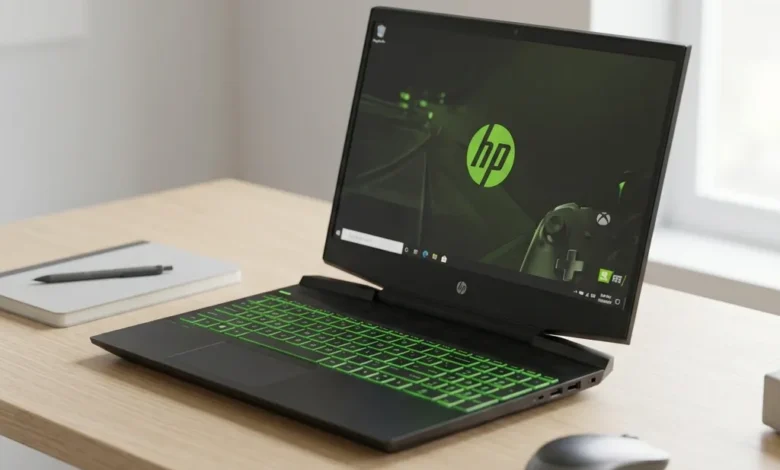
I remember the first time I came across the HP Pavilion Gaming 15 in a store. It didn’t scream “gaming laptop” the way ROG or Razer machines do no aggressive angles, no overwhelming RGB. It just looked clean, capable, and honestly a little underrated. That curiosity turned into a deep dive, and after testing multiple configurations and researching every variant from the 2017 model to the latest releases, I can confidently say this laptop has earned its place in the budget gaming market.
This guide covers everything specs, GPU variants, model numbers, real-world performance, and which configuration actually makes sense to buy.
What Makes the HP Pavilion Gaming 15 Worth Considering?
The HP Pavilion Gaming 15 laptop sits in a unique position in the market. It’s not trying to compete with ROG or Razer. Instead, it targets students, casual gamers, and first-time buyers who want genuine gaming capability without spending over $1,000.
What HP gets right with this lineup is consistency. Across years and configurations, the Pavilion Gaming 15 has maintained solid build quality, reliable thermals, and display options that punch above their price. It’s a workhorse laptop not glamorous, but dependable.
HP Pavilion Gaming 15 Specs: Core Configuration Overview
Here’s a full breakdown of the HP Pavilion Gaming 15 specs across major configurations:
| Spec | Entry Config | Mid Config | Top Config |
|---|---|---|---|
| CPU | Intel i5-9300H / Ryzen 5 | Intel i5-10300H | Ryzen 5 5600H |
| GPU | GTX 1650 | GTX 1650 Ti | RTX 3050 |
| RAM | 8GB DDR4 | 8GB DDR4 | 16GB DDR4 |
| Storage | 256GB SSD | 512GB SSD | 512GB SSD |
| Display | 15.6″ FHD 60Hz | 15.6″ FHD 144Hz | 15.6″ FHD 144Hz |
| Battery | 52.5Wh | 52.5Wh | 70.9Wh |
| Weight | 2.24 kg | 2.24 kg | 2.28 kg |
The jump from 60Hz to 144Hz between configurations is significant if you can afford the mid or top config, the display upgrade alone justifies it for gaming.
HP Pavilion Gaming 15 GTX 1650: The Entry Point
The HP Pavilion Gaming 15 GTX 1650 is where most people start with this lineup, and it’s still a capable configuration for the right use case.
The GTX 1650 is an older GPU, but it handles esports titles with zero issues. Valorant, CS2, Rocket League, and Fortnite all run at high frame rates without breaking a sweat. Where it starts to struggle is in modern open-world titles at medium-to-high settings.
What works well:
- Esports titles at 100+ FPS on medium-high settings
- Older AAA games at medium settings
- Indie and pixel art games absolutely fine
- Light video editing and streaming
Where it shows age:
- Cyberpunk 2077 and similar modern titles expect 30–40 FPS at low settings
- Ray tracing is not supported
- 4GB VRAM fills up quickly in texture-heavy games
The HP Pavilion Gaming 15 GTX 1650 review consensus across the board is consistent great for casual and esports gaming, limited for cutting-edge titles. Manage your expectations and it won’t disappoint.
HP Pavilion Gaming 15 I5-9300H GTX 1650: The 2019 Classic
The HP Pavilion Gaming 15 i5-9300H GTX 1650 combination was the signature build of the 2019 lineup and remains one of the most searched configurations to this day.
The i5-9300H was a solid quad-core processor for its time. Paired with the GTX 1650, it delivered a balanced gaming experience that made the Pavilion Gaming 15 genuinely popular among students and budget buyers.
This configuration is showing its age. The i5-9300H’s four cores feel limiting in modern titles that demand six or more cores. But for anyone still running this machine or picking one up secondhand, it remains a capable daily driver for light gaming and productivity.
HP Pavilion Gaming 15 2019 verdict: Still functional, but don’t expect miracles with modern AAA games. Upgrade the RAM to 16GB if you’re keeping it it makes a noticeable difference in multitasking performance.
HP Pavilion Gaming 15 I5-10300H GTX 1650 Ti: A Meaningful Step Up
The HP Pavilion Gaming 15 i5-10300H GTX 1650 Ti configuration brought two important upgrades over the 2019 model a faster processor and a slightly more capable GPU.
The i5-10300H improved single-core performance and added better thermal efficiency. The GTX 1650 Ti, while not dramatically different from the standard 1650, offers about 10–15% better performance thanks to higher CUDA core count and slightly faster memory bandwidth.
For buyers who found the base GTX 1650 configuration just slightly lacking, this mid-step configuration filled the gap nicely. It handled games like GTA V, FIFA, and Assassin’s Creed Origins at medium-high settings with smooth frame rates.
HP Pavilion Gaming 15 Ryzen 5: AMD Enters the Picture
The HP Pavilion Gaming 15 Ryzen 5 variants marked a significant shift in the lineup. AMD’s Ryzen processors brought better multi-core performance and improved power efficiency to the Pavilion Gaming platform.
The Ryzen 5 configurations come in two main flavors older Ryzen 5 4600H paired with GTX 1650, and the newer Ryzen 5 5600H paired with more capable GPUs. Both offer a noticeably smoother experience than their Intel equivalents in multi-threaded workloads like game streaming and content creation.
HP Pavilion Gaming 15 Ryzen 5 5600H GTX 1650: Modern CPU, Older GPU
The HP Pavilion Gaming 15 Ryzen 5 5600H GTX 1650 is an interesting configuration a genuinely modern six-core processor paired with an entry-level GPU.
The Ryzen 5 5600H is an excellent mobile processor. Six cores, twelve threads, and Zen 3 architecture make it significantly more capable than anything in the older Intel configurations. The bottleneck here is clearly the GTX 1650, which limits gaming performance despite having a powerful CPU driving it.
This configuration shines in:
- Streaming while gaming the 5600H handles encoding beautifully
- Productivity workloads alongside gaming
- Future-proofing the CPU side while keeping GPU costs down
For pure gaming, the GPU is the limiting factor. But if you do a lot of multitasking or creative work alongside gaming, this config is surprisingly well-balanced.
HP Pavilion Gaming 15 Ryzen 5 5600H RTX 3050: The Best Pavilion Config
In my opinion, the HP Pavilion Gaming 15 Ryzen 5 5600H RTX 3050 is the strongest all-around configuration in the entire Pavilion Gaming 15 lineup.
The RTX 3050 brings DLSS support, ray tracing capability, and a meaningful GPU performance jump over the GTX 1650 family. Combined with the Ryzen 5 5600H’s strong multi-core performance, this configuration handles modern gaming with confidence.
Real-world gaming performance:
- Valorant — 200+ FPS at high settings
- Fortnite — 80–100 FPS at high settings with DLSS
- GTA V — 90+ FPS at high settings
- Cyberpunk 2077 — 45–55 FPS at medium with DLSS Quality
- Elden Ring — 55–60 FPS at medium-high settings
For a budget gaming laptop, those numbers are genuinely impressive. This is the configuration I’d recommend to anyone shopping the Pavilion Gaming 15 lineup.
HP Pavilion Gaming 15 2017 Refresh Rate: A Look Back
The HP Pavilion Gaming 15 2017 refresh rate is something that comes up often in older buyer discussions and understandably so. The 2017 model shipped with a 60Hz display, which by today’s standards feels sluggish for competitive gaming.
60Hz was acceptable in 2017 when most budget gaming laptops shipped with the same limitation. But if you’re picking up a used 2017 model today, the display is the biggest compromise you’ll make. Everything else build quality, keyboard, audio holds up reasonably well for light use, but the 60Hz panel is a constant reminder of its age.
If gaming smoothness matters to you, skip the 2017 model entirely and look for 2020 or newer configurations with 144Hz panels.
HP Pavilion Gaming 15 Model Numbers Explained
ASUS isn’t the only brand with confusing model codes HP’s naming can be equally cryptic. Here’s a breakdown of the most searched Pavilion Gaming 15 model numbers:
DK Series (Intel):
- HP Pavilion Gaming 15 DK0042TX — i5-9300H, GTX 1650, 8GB RAM, 256GB SSD
- HP Pavilion Gaming 15 DK0043TX — i5-9300H, GTX 1650 Ti, 8GB RAM, 512GB SSD
- HP Pavilion Gaming 15 DK1009NT — i5-10300H, GTX 1650 Ti, 8GB RAM, 512GB SSD
- HP Pavilion Gaming 15 DK2757ND — i5-11300H, GTX 1650, 8GB RAM, 512GB SSD
EC Series (AMD):
- HP Pavilion Gaming 15 EC0001AX — Ryzen 5 3550H, GTX 1650, 8GB RAM
- HP Pavilion Gaming 15 EC0101AX — Ryzen 5 4600H, GTX 1650, 8GB RAM
- HP Pavilion Gaming 15 EC2047AX — Ryzen 5 5600H, GTX 1650, 16GB RAM
- HP Pavilion Gaming 15 EC2143NF — Ryzen 5 5600H, RTX 3050, 16GB RAM
- HP Pavilion Gaming 15 EC2XXX — Ryzen 5 5600H series, various GPU options
Understanding these codes helps you instantly identify what you’re getting when shopping across different retailers or buying secondhand.
Build Quality and Daily Use Experience
The HP Pavilion Gaming 15 laptop uses a plastic chassis throughout, which keeps weight and cost down without feeling flimsy. The lid has a subtle texture that resists fingerprints, and the overall construction feels solid enough for daily carry.
Keyboard: Full-size with numpad, decent key travel, single-zone RGB backlight on newer models. Not the best gaming keyboard I’ve used, but comfortable for long sessions.
Trackpad: Adequately sized, responsive, and smooth. Not a standout, but functional for productivity tasks between gaming sessions.
Audio: Dual speakers deliver acceptable sound for casual use. Don’t expect anything impressive — plug in headphones for serious gaming.
Ports: USB-A (x3), USB-C, HDMI 2.0, SD card reader, and headphone jack. The port selection is genuinely practical for a budget gaming laptop.
Cooling: The dual-fan thermal system manages heat reasonably well across all configurations. The RTX 3050 variant runs warmer under load, but temperatures stay within safe limits with the performance mode enabled.
For more tech and gaming gear guides, check out more at Bussinessvogue.
Who Should Buy the HP Pavilion Gaming 15?
Buy it if:
- You’re a first-time gaming laptop buyer on a budget
- Your game library skews toward esports and older titles
- You need a dual-purpose machine for college and gaming
- You want a reliable brand with good after-sales support
Skip it if:
- You want to play every new AAA game at ultra settings
- High-refresh gaming above 144Hz is important to you
- You need professional color accuracy for creative work
- Portability is a priority — at 2.24 kg it’s not the lightest option
Conclusion
The HP Pavilion Gaming 15 has earned its reputation as one of the most reliable budget gaming laptops across multiple generations. From the classic i5-9300H GTX 1650 combination of 2019 to the capable Ryzen 5 5600H RTX 3050 configurations of today, HP has consistently delivered solid value in this lineup.
If I had to pick one configuration to recommend, it would be the Ryzen 5 5600H with RTX 3050 — it’s the sweet spot of modern CPU performance, capable GPU horsepower, and budget-friendly pricing that makes the Pavilion Gaming 15 worth every penny.
FAQs
Is the HP Pavilion Gaming 15 good for gaming.
Yes, depending on the configuration. The Ryzen 5 5600H with RTX 3050 variant handles most modern games well at medium settings. Older GTX 1650 configurations are better suited for esports and casual gaming titles.
What is the difference between DK and EC series models?
DK series models use Intel processors while EC series models use AMD Ryzen processors. Both share the same chassis and display options but differ in CPU performance characteristics and power efficiency.
Can the HP Pavilion Gaming 15 run Cyberpunk 2077?
The RTX 3050 configuration can run Cyberpunk 2077 at medium settings with DLSS enabled, achieving around 45–55 FPS. GTX 1650 variants struggle significantly with this title and are better suited for older or less demanding games.
How much RAM does the HP Pavilion Gaming 15 support?
Most configurations support up to 32GB DDR4 RAM across two SO-DIMM slots. The base 8GB configuration is upgradeable, and adding a second 8GB stick makes a noticeable difference in multitasking performance.
Is the 2019 HP Pavilion Gaming 15 still worth buying?
As a secondhand purchase at a significantly reduced price, yes for light gaming and productivity. For primary gaming use with modern titles, newer configurations offer substantially better performance and value.